NPU 커널 드라이버 및 펌웨어 설치
FuriosaAI는 평가를 위한 환경 Alveo U250, AWS F1 에 대해 커널 드라이버 및 펌웨어를 제공한다. 평가 중인 환경에 맞게 아래 두 가지 중 알맞은 방식을 골라 설치를 진행한다.
Alveo U250 커널 드라이버 및 펌웨어 설치
$ git clone https://github.com/furiosa-ai/furiosa-fpga-install.git
$ cd furiosa-fpga-install
$ sudo ./install_furiosa_fpga_u250

Furiosa AI's F1 SDK has been successfully installed.
Please REBOOT this machine to complete the installation.
furiosa-fpga-install 저장소에 포함된 check_fpga_device 명령어로
설치가 성공적으로 되었는지 확인할 수 있다.
$ cd furiosa-fpga-install
$ ./check_fpga_device
[OK] Furiosa AI's FPGA device is detected.
AWS F1 커널 드라이버 및 펌웨어 설치
요구 사항
FuriosaAI에서 제공하는 평가용 AWS F1 FPGA 이미지 접근 권한 * AWS account ID를 FuriosaAI에게 공유하면 권한을 받을 수 있다.
AWS F1 인스턴스 * 현재는 f1.2xlarge 타입만 지원한다. * f1 인스턴스는 AWS의 일부 지역에서만 사용 가능하다. (예. US East (N. Virginia))
FuriosaAI AWS F1 FPGA 이미지 접근 권한 획득 (AWS Account ID 전달)
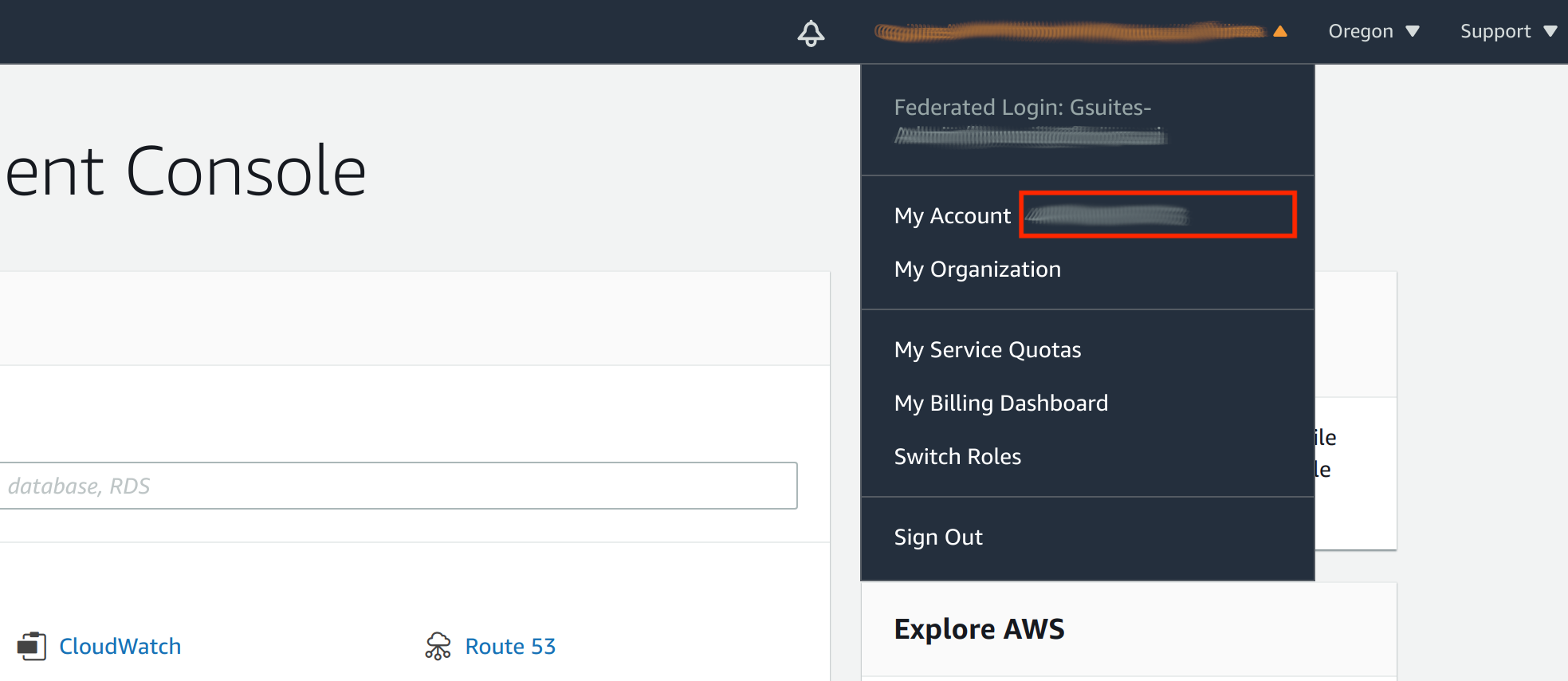
AWS console 에 로그인 한 뒤에 우측 최상단 Account 이름을 클릭하면 팝업 창이 뜬다. My account 옆에 있는 빨간 박스에 위치한 12 자리 숫자 AWS Account ID 를 FuriosaAI에 전달한다.
설치
f1.2xlarge 인스턴스 생성후 인스턴스 내에서 아래 명령을 통해 커널 드라이버와 펌웨어를 설치할 수 있다.
$ git clone https://github.com/furiosa-ai/furiosa-fpga-install.git
$ cd furiosa-fpga-install
$ sudo ./install_furiosa_fpga_aws_f1

...
Furiosa AI's F1 SDK has been successfully installed.
Please REBOOT this machine to complete the installation.
furiosa-fpga-install 저장소에 포함된 check_fpga_device 명령어로
설치가 성공적으로 되었는지 확인할 수 있다.
$ cd furiosa-fpga-install
$ ./check_fpga_device
[OK] Furiosa AI's FPGA device is detected.